
For WooCommerce · Prices and compliance
The lowest price of the last 30 days next to every WooCommerce sale price (EU Omnibus Directive), with a discount check.
Coming to WordPress.orgLogs the price history of every product and variation and shows the lowest price applied in the 30 days before a reduction, as the EU Omnibus Directive asks, with a check for misleading discounts.
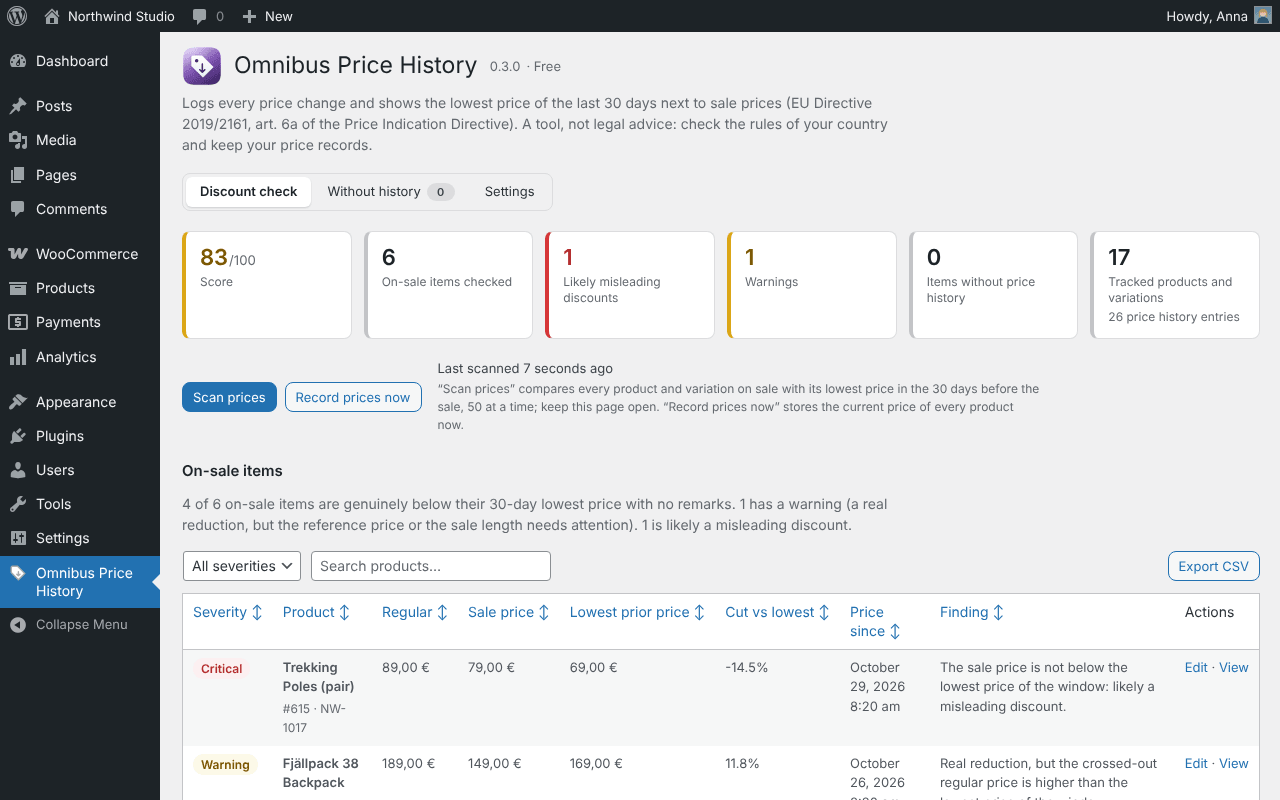
Why the 30-day Lowest Price Matters for Every EU Shop
Since the EU Omnibus Directive, a shop that announces a price reduction must also show the lowest price it applied in the 30 days before the reduction. The rule stops fake discounts where the price is raised for a week and then "reduced". Consumer protection authorities check it, and WooCommerce does not record price history on its own, so a shop that runs sales without it has no way to show the right reference price.
Omnibus Price History records the price of every product and variation on every save and with a daily snapshot, and shows the 30-day lowest price under the sale price on product pages and optionally in the shop, with variations updating live. The discount check lists sale prices that are not actually below the 30-day lowest price and sales that have run too long, so you can fix them before a customer or an authority notices.
Who it is for
- WooCommerce shops that sell to consumers in the EU.
- Shops that run frequent sales, Black Friday and seasonal campaigns.
- Agencies setting up shops for EU clients.
Free
- Price history per product and variation, recorded on every save and by a daily snapshot
- The 30-day lowest price under the price, on product pages and optionally in the shop; variations update live
- Classic and block themes; configurable text, window and position; a shortcode for page builders
- Discount check: sale prices that are not below the 30-day lowest price, and sales running too long
- Price history box on the product screen; HPOS compatible
Free in full: no paid features and no limits. Omnibus Price History is one of the checkers for WooCommerce in the free Store Toolkit family; it is not part of Clearyvo Pro.
Good to Know
- Needs WooCommerce. A technical aid, not legal advice.
Where to Get It
Omnibus Price History is the free plugin Clearyvo Omnibus Price History. On its own it has its own menu right after WooCommerce. With Store Toolkit or a second Clearyvo checker for WooCommerce it moves under one Store Toolkit menu and counts in the Store health score. It is not part of Clearyvo Pro.
WordPress 6.2, PHP 7.4, WooCommerce. English interface.
How to Show the 30-day Lowest Price in WooCommerce
- Install the free Clearyvo Omnibus Price History plugin: under Plugins → Add New Plugin once it is on WordPress.org, or with the download button on this page (then Plugins → Add New Plugin → Upload Plugin). With Store Toolkit you can also add it under Store Toolkit → Checkers.
- Open Omnibus Price History in the WordPress admin (under Store Toolkit when you use more than one Clearyvo checker for WooCommerce) and run the check. It works in short steps, so it finishes on shared hosting and large sites too.
- Read the report. Nothing on the site changes until you tick an item and confirm.
Related Checkers
- Store Toolkit: One Store health score, one menu after WooCommerce and one-click install of every free Clearyvo checker for WooCommerce.